
One link, four screens, and a purchaser who telephones the seller
The part people get wrong is not the clicking. It is that the first payment is not the last one, and that a remark typed in the wrong box never arrives.
Every screen below is the operator interface as it was published in the help centre, read on the review date printed in the footer.
In this guide
What PonyBuy is, in the sentence it uses itself
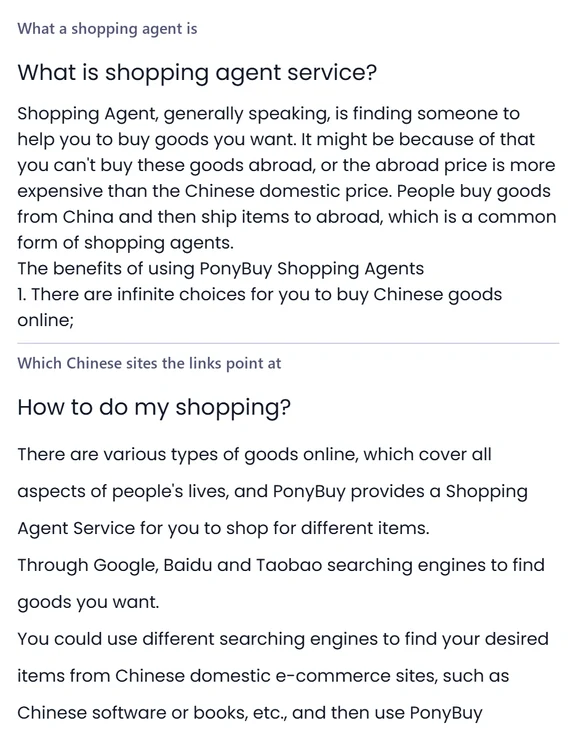
PonyBuy is a Chinese buying agent. Its own definition of the service is finding someone to help you buy goods you want, and the reason it gives is the honest one: either the thing is not sold where you live, or it costs more there.
Mechanically that means PonyBuy buys in its own name, from a Chinese seller, with a Chinese address as the delivery point. You never appear in that transaction. The seller ships to the PonyBuy warehouse, not to you, and the second half of the journey is a separate decision you make later.
It also names the ground the links come from: the Chinese domestic e-commerce platforms, the ones you would reach through Google, Baidu or Taobao search. Which one a particular link belongs to changes what you should check before you spend, and that is worth two minutes.
The order, step by step
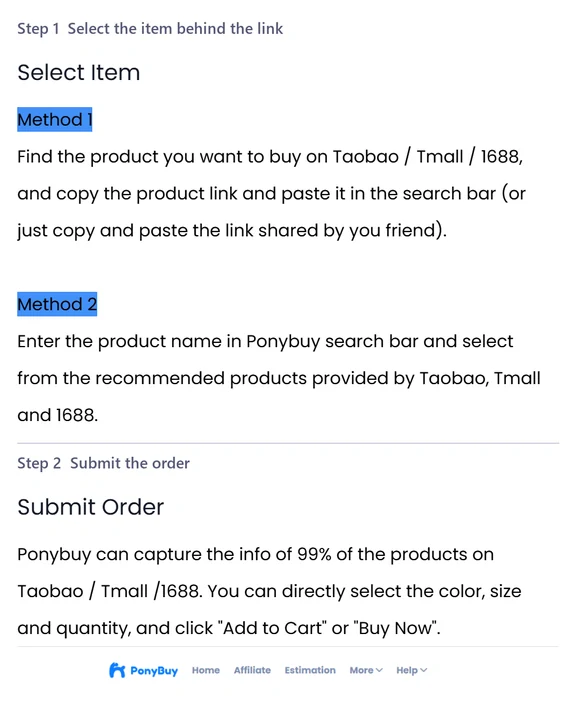
Four screens, in this order, with nothing optional in between. The step names below are the ones printed on the operator interface, not labels this site invented for them.
Select the item behind the link
Paste the product address into the PonyBuy search bar, or type the name and pick from what Taobao, Tmall and 1688 return. A link a friend sent you works the same way.
Submit the order
PonyBuy says it can read the specifications off roughly all of the products on those three platforms, so colour, size and quantity come up as selectable fields rather than as free text. Then add to cart, or buy outright.
Pay for the items and the Chinese leg
This payment covers the item and its delivery to the PonyBuy warehouse inside China. It does not cover getting the parcel to you. The same screen asks for your destination country and for any remark the purchaser needs.
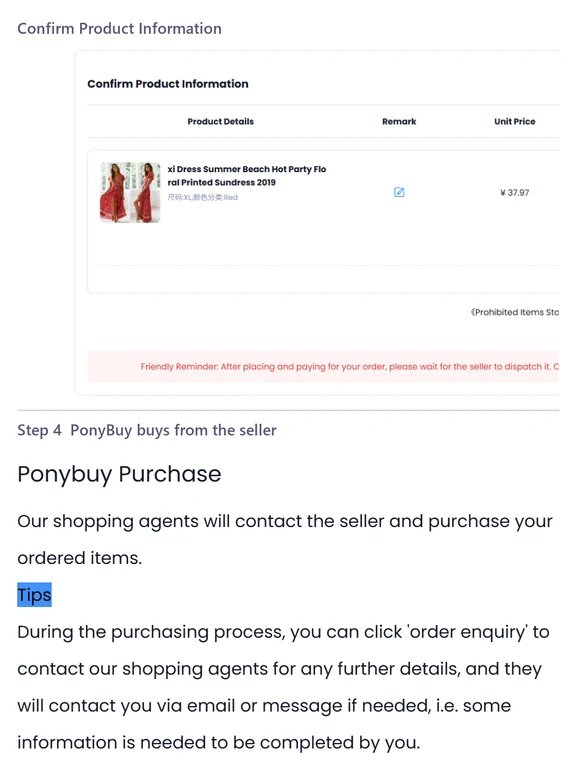
A purchaser buys it
A person at PonyBuy contacts the seller and places the order. From here the order has a status, and the statuses are worth learning because they are the only thing that tells you where the item is.
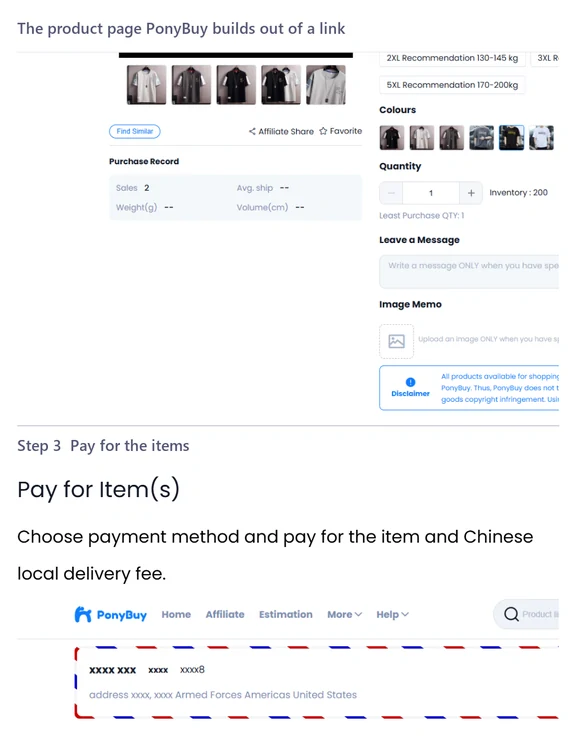
The product page PonyBuy builds out of a link
A link is not passed through to you as a link. PonyBuy reads the seller page and rebuilds it as a product page of its own, with the options it managed to extract laid out as fields. It claims it captures the specifications of almost every product on the three platforms it names.
That rebuilt page is where most mistakes get made, because it looks like a shop and is not one. The colour swatch you pick is the seller variant, and if the seller has mislabelled it, PonyBuy will buy the mislabelled one. The quantity field is the seller quantity, and ordering three of something from one seller is a different parcel from ordering one thing from three sellers. The remark box is the only channel that reaches the purchaser before the purchase happens.
If what the page shows and what the seller actually holds turn out to disagree, that is common enough to have a page of its own here.
The first payment, and what it does not cover
PonyBuy lists credit cards, WeChat and Alipay, and says it accepts several currencies. What matters more than the method is the boundary: this payment buys the item and moves it to the warehouse. Shipping out of China is quoted later, once the parcel exists and has been weighed, and it is a separate transaction.
On the same screen you set the destination country, add remarks, and pick any value-added services you want applied when the item lands. PonyBuy reviews the order against current customs policy at this point and says it will come back to you if something in it looks restricted. Then a purchaser contacts the seller.
The mechanics of the payment itself, the verification wait, and what to do when a card is refused are on the paying page.
What each step leaves behind
Every screen creates something you can point at later when a conversation with support goes in circles. This is what exists after each one.
| After this step | You now have | What it is good for |
|---|---|---|
| Selecting the item | A product page rebuilt from the seller listing | Checking that the variant you picked is the one the seller sells |
| Submitting the order | An order with a status | Everything later hangs off this number, including refunds |
| The first payment | A destination country and your remarks on file | The customs review, and anything the purchaser has to ask the seller |
| The purchase | A seller who has been contacted | The dispatch clock starts here, not when you paid |
| Arrival at the warehouse | Photographs and a weight | Deciding a route, and what the warehouse does |
Only the last row is not part of ordering. It is here because people reasonably expect the first payment to be the end of it, and it is not.
What people ask while the first order is open
Three that come up before the order has a status. The longer list, including the terms you will meet, is on the questions page.
Do I have to paste a link, or can I search?
Either. PonyBuy says you can paste the address of a product on Taobao, Tmall or 1688, including one a friend sent you, or type the product name into its own search box and pick from what those platforms return. The result is the same order either way.
Why does it ask me for a destination country so early?
Because the country decides what can legally leave China in your parcel, and PonyBuy reviews that before it buys rather than after. It asks for the country and for any remarks on the same screen as the first payment.
What if the seller needs to be asked something?
Use the order enquiry link on the order itself. PonyBuy says its purchasers will contact you by email or message when they need something from you, and that the same channel works in the other direction while the order is being bought. A remark typed on the order reaches the purchaser. A remark typed anywhere else does not.