
A number that goes quiet, and a box too big to fly
Once the parcel leaves the warehouse it stops being something you can do anything about, which is exactly when people start refreshing. This is what the silence usually means.
Everything before dispatch is on the shipping page. This one starts at the moment the box is handed over.
In this guide
Where the number lives, and why it lags
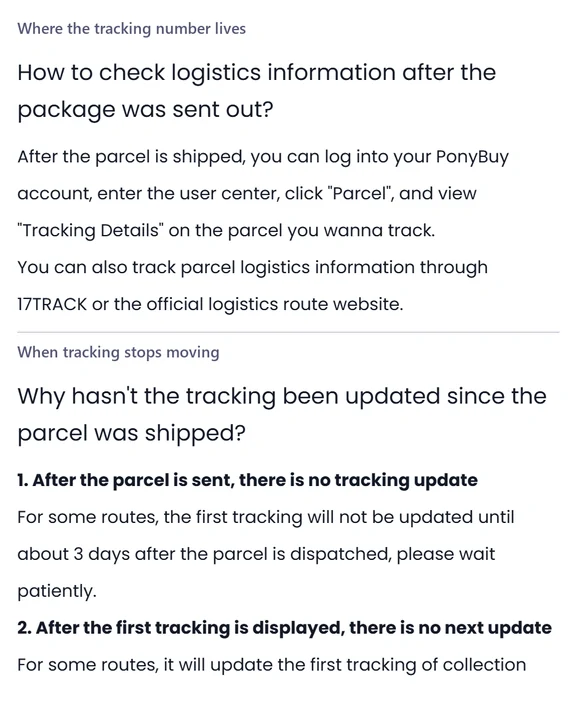
The tracking number appears under Parcels in your account, on the parcel rather than on the order it came from, behind a link labelled Tracking Details. PonyBuy also points you at an aggregator and at the carrier site, which is the honest recommendation because its own page is only ever showing you what the carrier gave it.
The lag is the part that needs saying out loud. International routes hand a parcel between several operators and each handover is a chance for the record to fall behind the box. PonyBuy names small packet services as the typical offender. In practice this means the tracking page is not a live map, it is a log that catches up, and a quiet day is a gap in the log rather than a gap in the journey.
It also publishes the two silences that alarm people most, and both are normal. On some routes the first scan does not appear for about three days after dispatch. After that first scan there is a second gap while the parcel waits for the courier to collect it, which it puts at three to ten days depending on the route. Neither of those is a reason to open a ticket, and the article says so more politely than this page does.
What a particular silence usually means
Six things that look like a problem. Four of them are the process working. The distinction is worth having in front of you before you spend an evening on a tracking page.
| What you are seeing | What it usually is | What it asks of you |
|---|---|---|
| No scan at all since dispatch | Normal on some routes for the first few days | Nothing. This is named as expected behaviour |
| One collection scan, then nothing | The wait before the courier picks it up | Nothing. The published range runs to over a week on some routes |
| The plane entered the port | A genuine node, not an error message | Nothing. It means in transit, or landed and waiting for a local scan |
| Movement, then a question about your address | Customs wants paperwork or cannot reach you | Answer it quickly. An unreachable recipient becomes a return |
| Returned before it ever left China | Domestic security screening refused the parcel | PonyBuy says it contacts you and sends it again at no charge |
| Returned after it left China | Failed screening, nobody signed, or the address did not resolve | The redelivery is at your cost. That is the published rule |
The last two rows are the ones to read before you submit a parcel rather than after. They come from the signing article, which also covers what happens when a parcel is held: the notices on signing for a parcel.
When the normal route list is the wrong tool
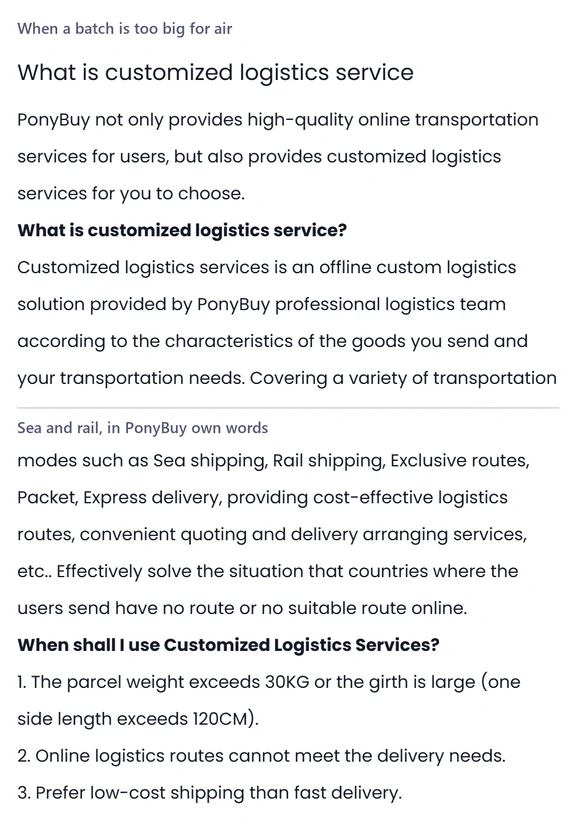
There is a second shipping service that never appears in the route selector, because it is not an online product at all. PonyBuy describes customised logistics as an offline solution put together by its logistics team around the characteristics of your goods, covering sea, rail, exclusive routes, packet and express.
It names three situations for using it. The parcel weighs more than thirty kilograms, or one side runs past a hundred and twenty centimetres. Or the online routes cannot reach where you are at all, which it frames as the problem this service exists to solve. Or you would rather pay less and wait longer, which sea and rail are good at and air is not.
Then it does something worth crediting: it tells you when not to use it. If the parcel is not heavy and the online routes can serve you, it says the online routes win on both price and time and recommends you submit normally. An agent talking you out of its own paid service is rare enough to be worth reading in its own words.
How the offline service is actually started
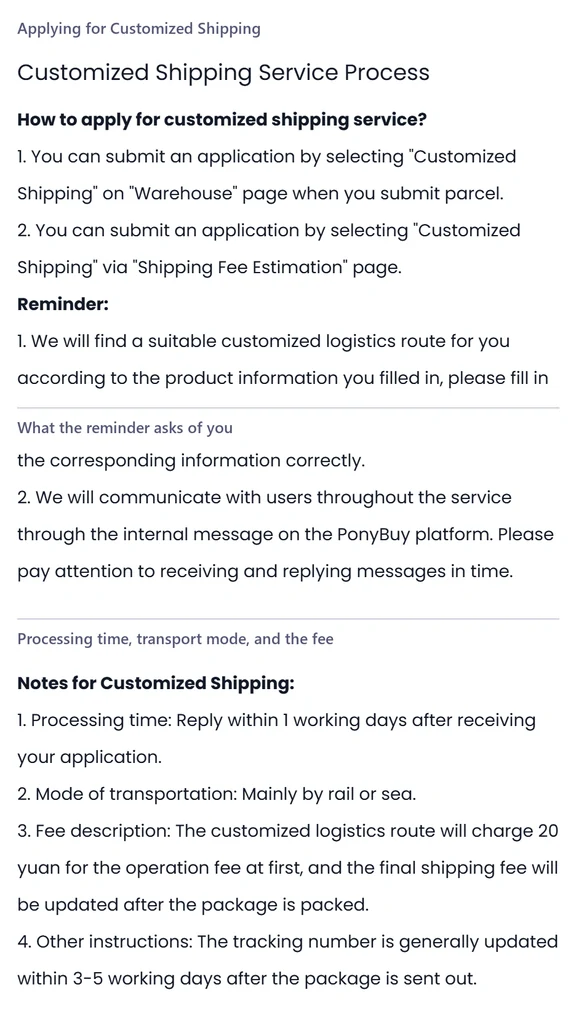
There are two doors into it and both are places you would already be. One is the Warehouse page at the moment you submit a parcel, where Customized Shipping sits alongside the normal routes. The other is the shipping estimate page, which is the better one, because you find out before you have committed to anything.
Whatever you type about the goods is what the logistics team works from when it looks for a route, so the accuracy of that form decides the quality of the quotation. PonyBuy says the whole conversation afterwards happens through the internal message system on the platform rather than by email, which is a detail worth knowing since that inbox is easy to never open.
The service commitments are short. It replies within a working day of the application. Transport is mainly rail or sea. An operation fee is charged up front in Chinese Yuan, and the real freight is only set once the warehouse has packed the box. The tracking number generally appears within three to five working days after dispatch, which is longer than the online routes and is the trade you are making. The process article lists all of it.
The whole offline path, as the operator draws it
PonyBuy publishes the sequence as a flowchart, and it is the clearest picture in its help centre because it shows the branch. The application is reviewed before anything else happens, and the review can go either way.
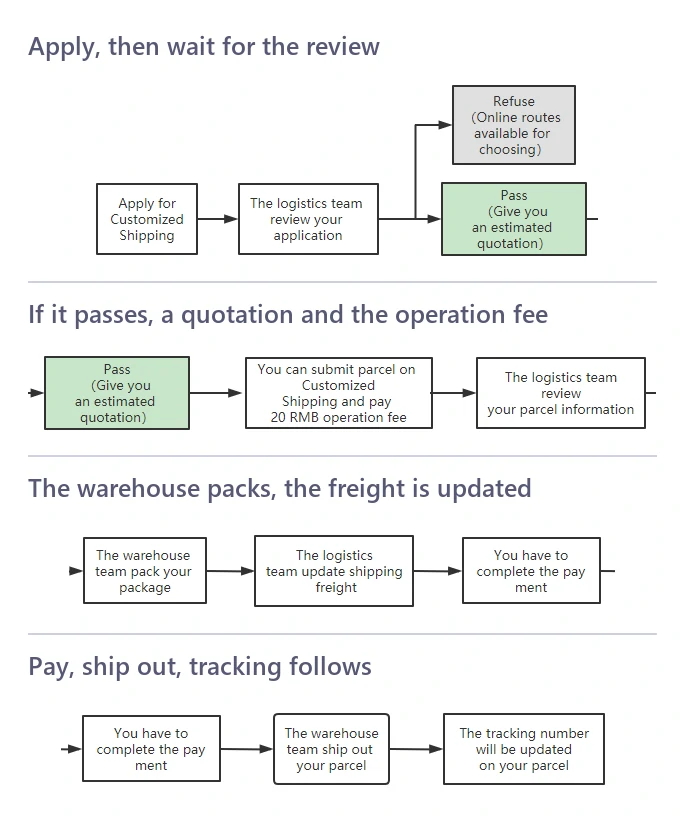
The grey box is the interesting one. A refusal here does not mean your parcel cannot travel, it means the team found online routes that will carry it, and it sends you back to the normal list. The green box is where a quotation appears, and nothing is payable before that point. Two separate reviews sit in the path, one on your application and one on the parcel information you submitted afterwards, which is the reason the whole thing is measured in working days rather than minutes.
The day it arrives, and the days after
The last stretch has its own published rules and they are more specific than anything else in the help centre. Most of them have a clock on them, which is why they are worth reading before the box is at the door rather than after.
| The situation | What PonyBuy undertakes | What it needs from you |
|---|---|---|
| The box arrives visibly torn | Nothing yet. This one is entirely in your hands | Inspect it in front of the courier, then sign with comments or refuse it |
| You find the damage after signing | It negotiates compensation with the local post office | Keep the original packaging sealed, and send photographs and the invoice within two business days |
| A fault shows up after a while of use | It contacts the Chinese seller about a refund or an exchange | The original proof of purchase and the guarantee card, inside the guarantee period |
| A return is arranged | It charges no service fee for acting for you | The return shipping cost, and acceptance that it can decline items outside the guarantee conditions |
| The parcel is confiscated | It says it verifies material and category but cannot judge authenticity | Responsibility for that outcome, which it states plainly |
| Everything is fine | Nothing further, unless you ask | Confirm delivery under Parcels. After sales can still be opened from the same parcel later |
Two clocks are hidden in that table and neither is negotiable. The inspection in front of the courier only counts before you sign, and the photographs and invoice only count inside the two business days. Miss either and the remaining route is the guarantee period, which needs paperwork you may not have kept. The after sales article is the one to read.
Four questions asked at a tracking page
The terms that appear on these screens, and the rest of the common questions, are on the questions page.
The tracking has not moved in a week. Should I worry?
Probably not, and PonyBuy publishes the reason. On some routes the first scan does not appear until about three days after dispatch. After that first scan there is a second gap, while the parcel waits to be collected and scanned by the courier, and it puts that gap at anything from three to ten days depending on the route.
What does the plane entered the port mean?
It is a real node on some routes rather than an error. PonyBuy says it means one of two things: the parcel is in transit, or it has reached the destination country and is waiting to be scanned and processed locally. Its advice at that status is to wait.
My batch is too heavy for any route on the list. What now?
That is the case customised shipping exists for. PonyBuy names the thresholds: a parcel over thirty kilograms, or one side longer than a hundred and twenty centimetres, or a destination where the online routes simply do not go. It is handled offline by its logistics team rather than through the normal route selector.
The box arrived damaged. What do I have to do first?
Deal with it in front of the courier if you can see it: PonyBuy says to inspect a visibly torn parcel before signing, and to sign with comments or refuse it. If you only find the damage afterwards, keep the original packaging sealed and send photographs and the invoice within two business days, because that is the window it has for negotiating with the local post office.